반응형
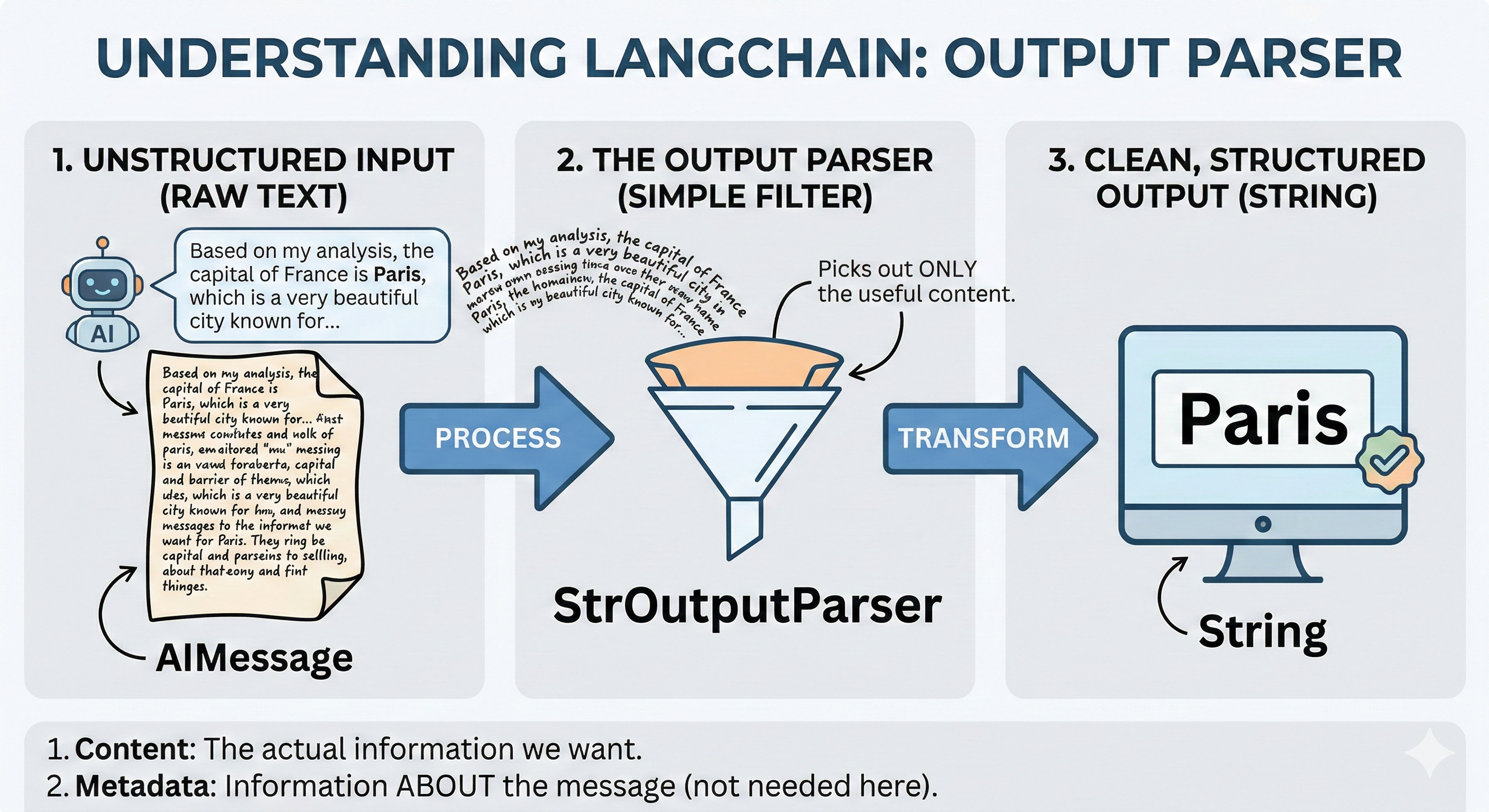
1. Output Parser의 필요성
- 복잡성 해소: 기존 LLM 응답은
AIMessage객체 내에 텍스트 외에도 토큰 정보, 메타데이터가 섞여 있어 바로 사용하기 어렵습니다. - 데이터 추출: 답변에서 특정한 내용만 추출하여 후속 로직(DB 저장, API 호출 등)에 즉시 활용할 수 있습니다.
2. 주요 활용 종류
📝 StrOutputParser
응답 내용 중 순수 텍스트(String)만 추출합니다.
응답 내용 중 순수 텍스트(String)만 추출합니다.
📊 JsonOutputParser
JSON 형태의 답변을 파이썬 딕셔너리로 변환합니다. (응답이 유동적일 수 있음)
JSON 형태의 답변을 파이썬 딕셔너리로 변환합니다. (응답이 유동적일 수 있음)
구조화 Pydantic
사전에 정의한 스키마(Schema)에 맞춰 객체 형태로 변환합니다.
사전에 정의한 스키마(Schema)에 맞춰 객체 형태로 변환합니다.
3. 실습 진행
① StrOutputParser 실습
가장 기본이 되는 파서로, 불필요한 메타데이터를 제거하고 핵심 답변만 가져옵니다.
from langchain_core.output_parsers import StrOutputParser
from langchain_core.messages import HumanMessage, SystemMessage

# LLM 응답을 문자열로 파싱해 주는 출력 파서
parser = StrOutputParser()

# 대화 프롬프트로 사용할 메시지 리스트 구성
message_list = [
    SystemMessage(content="You are chef."),
    HumanMessage(content="What's our dinner menu?")
]

# 메시지 리스트를 LLM에 전달 및 변환 전 결과
llm_result = llm.invoke(message_list)
print(llm_result)

print("================================================ 변 환 후 ==========================================================")

# 결과를 변환 및 변환된 결과 출력
parser_result = parser.invoke(llm_result)
print(parser_result)
변환 전 답변:
content="Creating a well-rounded dinner menu involves considering various elements such as meal
...
(생략)
...
available.\n\n4. ... id='lc_run--019c9ce0-9032-7e61-a1de-7f15e8570fbe-0' tool_calls=[] invalid_tool_calls=[] usage_metadata={'input_tokens': 13, 'output_tokens': 1162, 'total_tokens': 1175}
content="Creating a well-rounded dinner menu involves considering various elements such as meal
...
(생략)
...
available.\n\n4. ... id='lc_run--019c9ce0-9032-7e61-a1de-7f15e8570fbe-0' tool_calls=[] invalid_tool_calls=[] usage_metadata={'input_tokens': 13, 'output_tokens': 1162, 'total_tokens': 1175}
변환 후 답변:
Creating a well-rounded dinner menu involves considering various elements such as meal types,
...
(생략)
...
(pancakes) and menu structure from popular restaurant menus. By considering these elements, your dinner menu will be comprehensive, appealing, and adaptable to various settings.
Creating a well-rounded dinner menu involves considering various elements such as meal types,
...
(생략)
...
(pancakes) and menu structure from popular restaurant menus. By considering these elements, your dinner menu will be comprehensive, appealing, and adaptable to various settings.
② JsonOutputParser 활용 (딕셔너리 변환)
응답을 파이썬 dict 형식으로 받아올 수 있으나, 모델의 성능에 따라 형식이 불안정할 수 있습니다.
from langchain_ollama import OllamaLLM
from langchain_core.output_parsers import JsonOutputParser
from langchain_core.messages import HumanMessage, SystemMessage

# LLM 인스턴스 생성
llm = OllamaLLM(model="deepseek-r1:1.5b")

# LLM 응답을 JSON 문자열로 받아 파이썬 객체로 변환해 주는 파서
json_parser = JsonOutputParser()

# 대화 프롬프트로 사용할 메시지 리스트 구성
message_list = [
    SystemMessage(content="You are chef. Answer ONLY in JSON."),
    HumanMessage(content="What's our dinner menu?")
]

# 메시지 리스트를 LLM에 그대로 전달
llm_result = llm.invoke(message_list)

# 결과를 JsonOutputParser로 파싱 (JSON 텍스트 → dict/list)
parser_result = json_parser.invoke(llm_result)
print(parser_result)
print(type(parser_result))
결과
# parser_result 결과
{'info': {'response': 'The dinner menu can vary widely depending on the occasion and preferences. Common options include Italian, Mexican, Chinese, and American dishes such as pasta, risotto, steaks, or salads like Caesar or Mexican tacos.'}}
# parser_result 타입
<class 'dict'>
4. Pydantic을 활용한 고도화된 구조화 출력
가장 추천하는 방식으로, 데이터 규격(Schema)을 강제하여 완벽한 객체 데이터를 얻습니다.
from langchain_ollama import ChatOllama
from pydantic import BaseModel, Field
from langchain_core.output_parsers import PydanticOutputParser

# 0. ChatOllama LLM 인스턴스 생성
llm = ChatOllama(model="deepseek-r1:1.5b")

# 1. 원하는 출력 데이터 구조 정의 (Pydantic 모델)
class Menu(BaseModel):
    appetizer: str = Field(description="appetizer menu")
    soup: str = Field(description="soup menu")
    bread: str = Field(description="bread menu")
    salad: str = Field(description="salad menu")
    main_course: str = Field(description="main course menu")
    dessert: str = Field(description="dessert menu")
    coffee_tea: str = Field(description="coffee or tea menu")
    cost: int = Field(description="menu cost")

# 2. with_structured_output 사용: LLM이 위 Menu 스키마에 맞는 구조화된 응답을 돌려주도록 래핑
structured_llm = llm.with_structured_output(Menu)

# 3. 프롬프트 작성 및 호출
prompt = "Please recommend a dinner course."
result: Menu = structured_llm.invoke(prompt)

# 4. 결과 확인
print(result)
print(type(result))

# 5. JSON으로 변환
# 5-1. 파이썬 딕셔너리(dict) 형태로 변환
result_dict = result.model_dump()
print(f"Dictionary Type: {result_dict}")

# 5-2. 순수 JSON 문자열(string) 형태로 변환
result_json = result.model_dump_json()
print(f"JSON String Type: {result_json}")

# 5-3. 특정 값에 접근하기
print(f"Main Course: {result_dict['main_course']}")
결과는 다음과 같습니다
# result 결과값
appetizer='Lemon slice cube, 150g' soup='Salmon, 400g with sweet potatoes and steamed green beans' bread='Rice, 600ml' salad='Chopped romaine lettuce and cherry tomatoes, fresh herbs for seasoning' main_course='Lentil soup, 500ml, mixed with steamed broccoli and carrots' dessert='Deep-fried chocolate cake, warm apple pie, and dark chocolate as a snack.' coffee_tea='Coffee and herbal tea for cooling during the meal.' cost=1900

# result 타입
<class '__main__.Menu'>

# JSON Type으로 출력
Dictionary Type: {'appetizer': 'Lemon slice cube, 150g', 'soup': 'Salmon, 400g with sweet potatoes and steamed green beans', 'bread': 'Rice, 600ml', 'salad': 'Chopped romaine lettuce and cherry tomatoes, fresh herbs for seasoning', 'main_course': 'Lentil soup, 500ml, mixed with steamed broccoli and carrots', 'dessert': 'Deep-fried chocolate cake, warm apple pie, and dark chocolate as a snack.', 'coffee_tea': 'Coffee and herbal tea for cooling during the meal.', 'cost': 1900}

# JSON String 형태로 출력
JSON String Type: {"appetizer":"Lemon slice cube, 150g","soup":"Salmon, 400g with sweet potatoes and steamed green beans","bread":"Rice, 600ml","salad":"Chopped romaine lettuce and cherry tomatoes, fresh herbs for seasoning","main_course":"Lentil soup, 500ml, mixed with steamed broccoli and carrots","dessert":"Deep-fried chocolate cake, warm apple pie, and dark chocolate as a snack.","coffee_tea":"Coffee and herbal tea for cooling during the meal.","cost":1900}

# 원하는값 추출
Main Course: Lentil soup, 500ml, mixed with steamed broccoli and carrots
📝 마무리 및 회고
이제 AI의 답변을 단순히 '감상'하는 단계를 넘어, 프로그램에서 제어 가능한 String이나 JSON/객체 형식으로 자유롭게 다룰 수 있게 되었습니다. 데이터의 신뢰성을 확보하는 데 아주 중요한 과정이었습니다.
다음 포스팅에서는 이 모든 과정을 물 흐르듯 하나로 엮어주는 LCEL (LangChain Expression Language) 활용법에 대해 학습해 보겠습니다!
반응형
'AI > LangChain' 카테고리의 다른 글
| [#LangChain] 07. LCEL의 이해와 활용 (0) | 2026.02.27 |
|---|---|
| [#LangChain] 05. PromptTemplate 활용 가이드 (0) | 2026.02.26 |
| [#LangChain] 04. 외부 모델(Gemini) 연동 및 활용 (0) | 2026.02.26 |
| [#LangChain] 03. 로컬 LLM 실습 환경 구축 (0) | 2026.02.26 |
| [#LangChain] 02. 공식사이트 방문과 LangChain 생태계 이해 (0) | 2026.02.25 |


댓글